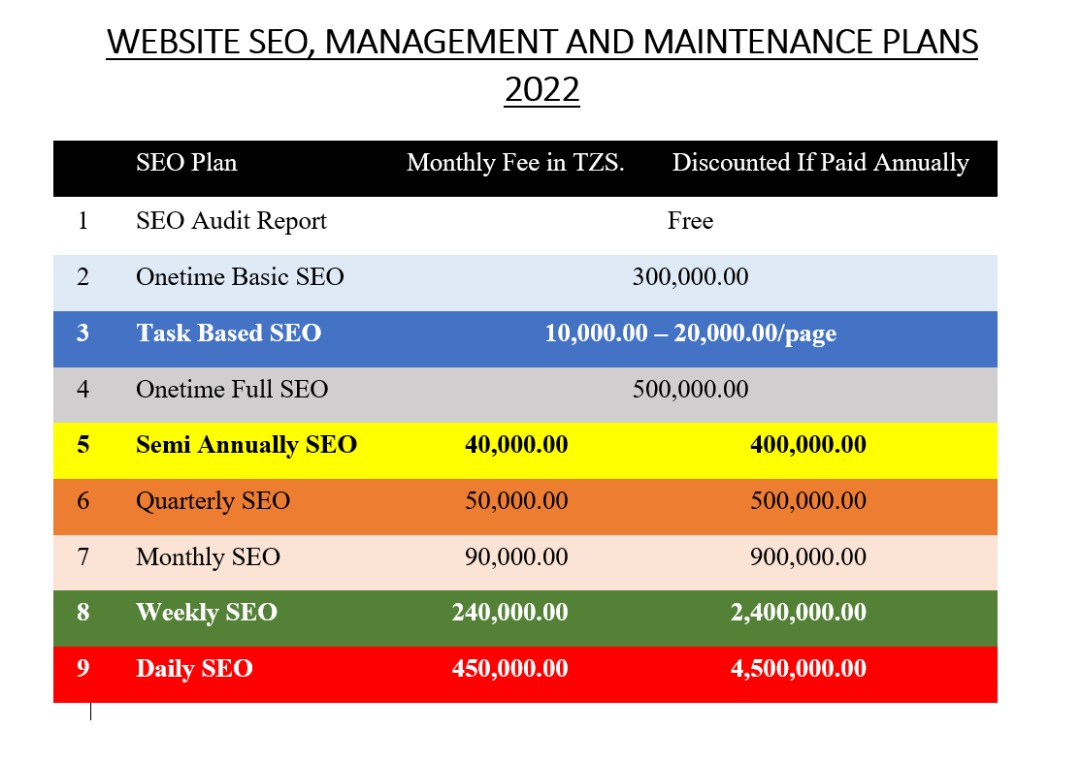
The website maintenance package is suitable for website owner with specific requirements to maintain and update the website. The webmaster will use about 2 hours
The service include but not limited to the following:
Updating text, images, replacing pages all limited to 10 pages
which are good parameters for good SEO
Attach a good booking/feedback form with spam filter
Scripts updating add new and remove unwanted one for CMS based websites only
Configure the website for good SEO. issues like URLS, Keywords, Sitemap, Social network links and posting, Canonicalization etc.
Hardening the website to prevent spams and any cyber attack
Optimizing the website to achieve more than 80% PageSpeed and YSlow meters, less than 6seconds page load time, less than 1.8MB of page size and less than 70 requests made
Quarterly webmaster reporting on any work done plus recommendations (if any)
All the above at a fee of TZS. 300,000
Note: The fee above does not include any third party paid service or software/scripts. If those items are required, a customer must buy them in a separate agreement
The objective of the web management or maintenance service is to keep your website alive with regular content and scripts update in order to make the website secure and speedy for good SEO.
Why Regular Website Management and Maintenance?
If The website is created using CMS which mean that it need regular maintenance and optimization in order:
Be secured from hacking, spamming and phishing
Be safe from failing to function and operate
Be with regular and updated contents for client good usage experience
Rank higher in search engines like Google in order to bring more orders online
How to choose the plan?
If you just need a minor update like changing contacts, names, photo and any small web maintenance that take less than 30 minutes to finish the work we can do it for free. More details found here FREE Website Management or Maintenance
If you have a one time issue with your website and you don’t plan to waste money for the service you actually don’t need, please choose our One Time Website Maintenance and Updating Plan
If you are planning to have a very serious online website which is safe and experiencing good Google ranking, have weekly website update, hardening and speed optimization for good SEO, please choose our Weekly Business SEO Website Management and Maintenance Plan
If you plan to have a serious starter safe website update, well hardened and having a jet speed, with plan to continue doing the rest for yourself, please choose without hesitation our Onetime Full SEO Website Management and Maintenance Plan
We will just install WordPress and provide password and username to the owner.
Premium WordPress Installation
We offer Premium WordPress Installation Plan at affordable price. With this installation you end up with a secured website that is not easily hacked, infected and damaged due to online insecurity vulnerabilities.
Installwordpress and provide password and username to the owner
Secure wordpress from basic attach like back-end protection, database protection, wordpress files and directories protection and wordpress script auto update setup
Price = TZS. 50,000 (On time payment)
Advanced WordPress Installation
Our Advanced WordPress Installation Plan enable you to get a secured and SEO enabled wordpress site.These are the two main attributes of a highly paying website
Installwordpress and provide password and username to the owner
Secure wordpress from basic attach like back-end protection, database protection, wordpress files and directories protection and wordpress script auto update setup
Prepare wordpress site for maximum SEO project: Included SEO enabling, Caching the website and URL Canonicalization
This package refers to the work that is done based on task and not time limit and charged per page.
The service intended for website that need to update content only and incorporate some basic features like web form, gallery and slider.
If the work is done using more than 5 minutes and requires editing more than one page we charge 20,0000/=per page or less. check the sequence of charging below:
A website with 1-10 pages will be charged TZS. 20,000/= per page
A website with 11-30 pages will be charged TZS. 15,000/= per page
A website with 31-50 pages will be charged TZS. 12,000/= per page
A website with 50-100 pages will be charged TZS. 10,000/= per page
A website with above 100 pages – open for negotiation
The service include but not limited to the following:
Updating text, images, replacing pages
Attach a good booking/feedback form, gallery, slider etc
NB:
All the work above has no contract/agreement
Professional services and or software/script deployment will need a separate contract