by admin | Dec 11, 2025 | Blog News - English, Server Resources
CPU over usage in many servers may be caused by one or multiple of the following reasons
- Bad coded scripts
- Excessive processes and requests caused by excessive scripts
- Many websites in one account
- Excessive cron jobs or scheduled tasks
- Hacked website
- Large volume of comment spam
- Uncontrolled search engine crawlers and excessive automated robots activity
- High volume of web traffic
by admin | Dec 11, 2025 | Domains Registration
Below is the full list of Tanzania local domains or TLDs. We offer affordable fees and a life time free domain registration with any hosting plan with us
- .co.tz – For commercial entities as per Tanzania laws. Examples: webmaster.co.tz
- .or.tz – For non-profit making organizations. Examples: ansaf.or.tz
- .go.tz – For Government entities such as ministries and agencies. Examples: mbinga.go.tz
- .ac.tz – For tertiary academic or technical institutions with accreditation. Examples: esis.ac.tz
- .ne.tz – For network people or hardware. Examples: tanganyika.ne.tz
- .mil.tz – Exclusively for Tanzania Military entities. Examples: tpdf.mil.tz
- .sc.tz – For schools (elementary, primary and secondary). Examples: upendo.sc.tz
- .tv.tz – For Television operators /stations. Examples: tbc.tv.tz
- .hotel.tz – For hotel operators. Examples: kilimanjaro.hotel.tz
- .mobi.tz – For mobile phone operators. Examples: zantel.mobi.tz
- .me.tz – For individual use (any Tanzanian). Examples: masanja.me.tz
- .info.tz – For informational sites such as museum. Examples: museum.info.tz
by admin | Dec 11, 2025 | Domains Registration
Below is the list of regular domains that are registered regularly and have constant and regular registration fee for years normally between 9-11 Us Dollar per year. Like Tanzania domains,We offer a life time free regular domain with any hosting plan subscription with us.
- .com – For commercial entities
- .net – For network of people or computers
- .org – For nonprofit entities
- .info – For information based websites/entities
- .biz – For business

by admin | Dec 11, 2025 | Blog News - English, Emails
In order to make Gmail work smoothly you need to apply proper settings for incoming and outgoing mailservers. Gmail is one of the most popular online email services today.
Once you configure your Gmail properly you can access incoming messages and also send mail using any email client like MS Outlook, Thunderbird etc.
If you want to know how to configure your mail server for Gmail, follow closely the guide below. Or If Alternative, You can buy Gmail Quick Source Guide from Amazon (Price is only $4.12) that include step by step instruction to help users to learn all the gmail features like Creating Filters, Labels, Desktop notifications and much more.
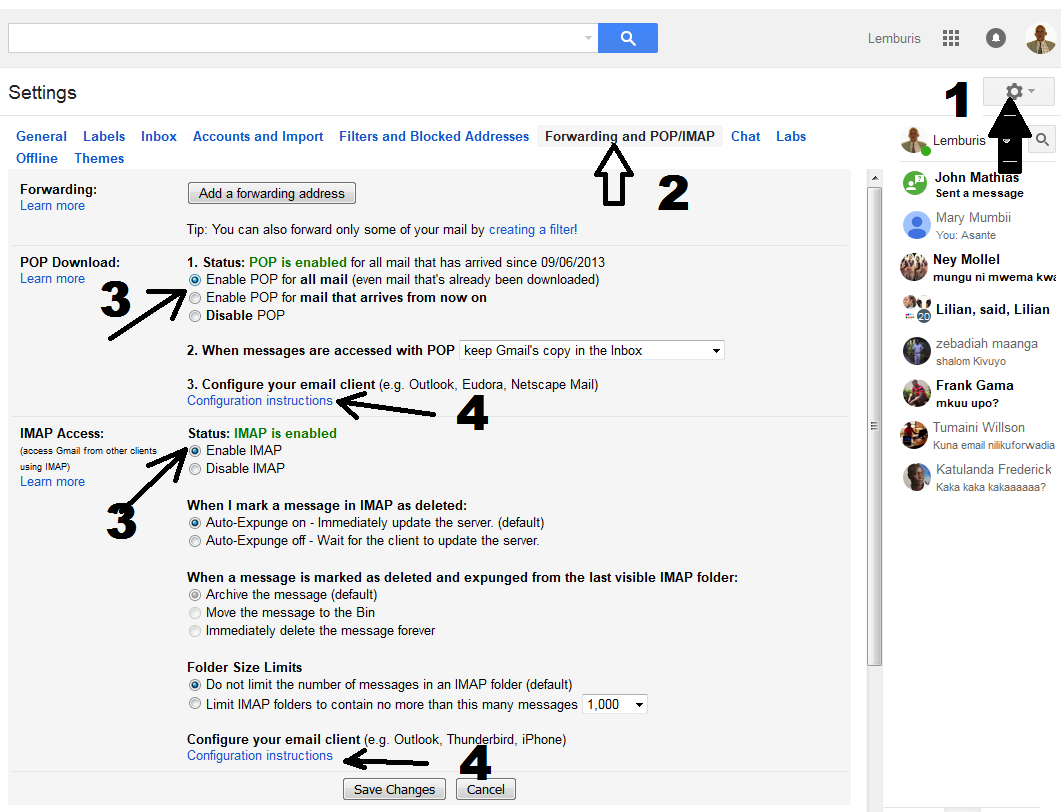
Before you start setting up make sure you enable POP3 or IMAP in your gmail Settings
Log into your Gmail account and open the Settings page with gear icon. Click on the Forwarding and POP/IMAP tab and make sure IMAP or POP3 is enabled and click on save changes. Open Outlook 2013 and go to File tab. Then, just above the Account Settings button, click Add Account.
Default PIMAP Setup:
|
Server: |
Authentication: |
Port: |
| SMTP Server (Outgoing Messages) |
Non-Encrypted |
AUTH |
25 (or 587) |
|
Secure (TLS) |
StartTLS |
587 |
|
Secure (SSL) |
SSL |
465 |
| IMAP Server (Incoming Messages) |
Non-Encrypted |
AUTH |
143 |
|
Secure (TLS) |
StartTLS |
143 |
|
Secure (SSL) |
SSL |
993 |
Default Pop3 Setup:
|
Server: |
Authentication: |
Port: |
| SMTP Server (Outgoing Messages) |
Non-Encrypted |
AUTH |
25 (or 587) |
|
Secure (TLS) |
StartTLS |
587 |
|
Secure (SSL) |
SSL |
465 |
| POP3 Server (Incoming Messages) |
Non-Encrypted |
AUTH |
110 |
|
Secure (SSL) |
SSL |
995 |
by admin | Dec 11, 2025 | Blogu ya Kiswahili, Namna ya Kulipa
- Kwenye sehemu ya kupigia simu Andika * 150 * 00 # na ubonyeze kitufe cha kupiga
- Chagua 1: Kutuma Pesa “BURE”
- Chagua 3: Tuma kwenda Benki
- Chagua 2: Benki ya CRDB
- Weka Nambari ya Akaunti ((Namba ya akaunti yetu ni: 01J1034874900 AU 0111034874900))
- Weka – kiasi kinachodaiwa (idadi Tu) = TZS………………………..
- Weka namba ya siri ili kuthibitisha muamala wako
Utapokea ujumbe kutoka Airtel
kwa mfano “Txn Id: NW160506.0901.A02324 Umelipa TZS.196,000.00 kwenda Benki ya CRDB (Mafanikio: Kiasi kilichobaki kwenye akaunti yako ni 200.00Tshs.”