
by admin | Dec 12, 2025 | Blogu ya Kiswahili
Kuifanya website ipande kwenye ukurasa wa kwanza wa Google watu wanaposearch keywords zinazoendana na website yako sio kazi rahisi. Kwanza website yako ni laZima ikae angalau siku 90 hadi 180 ili izoelewe na search engine bots.
Ili website au keywords za website zipande kwenye ukurasa wa kwanza wa Google, mambo kadhaa yanatakiwa kufanika.
Ufafanuzi
Google anapandisha keywords zako juu ya zingine kwa kutoa maksi. Keywords zako zikiwa na maksi za juu kuliko zingine zote itawekwa ya kwanza. Ili kuweza kutoa maksi bila upendeleo, Google ametengeneza maswali mengi ambayo yakijibiwa vizuri kwenye webpage yako keywords husika hupewa maksi. Haya maswali ndio huitwa algorithm au rules.
Googlebot ni code ambayo ina uwezo wa kutembelea webpage na kuchukua data husika kwa ajili ya kupeleka kwenye main database ya google. Hii bot nayo imewekewa masharti au rules au algorithm itakayomuwezesha kufanya kazi yake kwa ufanisi na bila kukosea.
Sasa ili website yako iingie kwenye ushindani wa kupewa maksi nyingi kwa baadhi ya keywords zake ni lazima yafuatayo yatekelezwa kwa ufanisi.
1. Taarifa za kutosha/nyingi na za kipekee unique content:
Taarifa zenye kubeba maneno yanayotafutwa kulingana na secta husika Mfano kama ni website ya utalii iwe na full itinerary content ambayo haijakopiwa popote kwenye internet
Title ya Page iwe na full title ya product mfano
7 Day Tour to Mwanza, Serenegti and Ngorongoro
Summary ya itinerary
Halafu description ya kila siku ikianza na title halafu summary of that day
Hakikisha piach zikiwekwa ziwe optimized kwa naman ya format na size. Format ziwe jpeg au png au gif. Size isiwe zaidi ya 100KB
2. Ukurasa unaoload kwa haraka na wenye code chache:
Website yako iwe na text nyingi kuliko code. Kama code zitakuwa nyingi page yako itakuwa nzito na Googlebot au bot zingine za search engine zikija zitasubiri kidogo halafu zitaondoka bila kuikagua page yako.
Code ni pamoja na html tags, javascript na css.
Muda wa ukurasa kuload unaoshauriwa ni kati ya sekunde 2 hadi 6
Ukubwa wa ukurasa ni si zaidi ya Megabyte 2
Processes requests zinazoshauriwa ni si zaidi ya 65
Pagespeed score kuanzia 80%
Haya yote unaweza kupima kwa kutumia GTMETRIX.COM
3. Menu rahisi kwa mteja na viunganishi angalau kila paragraph:
Hakikisha men imepangiliwa ili kumpa mteja urahisi wa kujua nini iko wapi. Uwe na mfumo maalum wa kuweka menu. Weka vitu vya mhimu tu kwenye parrent buttons na zenye umuhimu mdogo kwenye child buttons. Sio lazima kila kitu kilichopo kwenye website ionekane kwenye menu. Content zingine mteja anaweza kuzipata kwa kusearch. Hakisha pia uanwekla viunganishi vya kutosha na zinazoendanan na paragraph. Kumbuka viunganishi ni sehemu ya mawasiliano kwenye page. Wateja wanapoclick kwenye links zaidi wanakupunguzia Bounce rate na Google anaheshimu sana website yenye bounce rate ndogo
4. Kupandisha kwenye directories za nyumbani na nje kila wiki:
Pandisha angalau kwenye directories 10 kila wiki.
Anza kupandisha kwenye directory ya Google, BING na Yahoo
Ya Google ni muhimu zaidi na itakuwezesha website yako kupatikana kwenye Googlemap na pia kuonekana kulia mwa Google search engine kama featured listing kama inavyooshwa hapa chini kwenye screenshot hapo juu. Hii itasaidia sana kushawishi watu kutembelea website na pia kuongeza trust na reliability ya website yako. Unapolist website yako kwenye directory mbalimbali ikiwemo Google My Business hakikisha unatumia Brand name. Kama kwa mfano kampuni yako inaitwa Sunset Safaris and Travel Limited brand name hapo ni jina la kampuni yaani “Sunset Safaris and Travel Limited”. Tumia jina hilohilo bila kubadilisha. Usiwe na tamaa ya keywords kwa sababu hutapata. Hata kwenye Directories zingine na social media hakikisha unatumia brand name kama unatangaza kampuni au product brand names kama unatangaza products. Asante kama umenielewa.
5. Kupandisha na kushirikisha kwenye mitandao ya kijamii, forums, blogs nk
Shirikisha kwenye mitandao ya kijamii angalau kila siku mara moja
Kupandisha kwenye mitandao ya kijamii haina ubishi, ukurasa wa FB au Twitter au Linkedin au Youtube au Googleplus ambao umejengwa na kufanyiwa branding pamoja na kuwa popular unaongeza kwa kiwango kikubwa reliability na trust kutoka kwa wateja watarajiwa ambao ni wapya kabisa.
6. Kuweka ulinzi kwenye website yako
Imarisha ulinzi na usalama kwenye website yako ili isitekwe nyara au kutumika kwenye uhalifu wa kimtandao.
Kazi yote ni bure kama website yako inahackiwa na kuvamiwa kwa urahisi, kufanyiwa phishing na spamming. Website ambayo haiko salama inayofamiwa ovyo ovyo huwa mara nyingi iko offline na hivyo haitapata umaarufu wowote machoni mwa search engines. Pia website zenye virusi au ambazo hazina SSL certificates zitaogopwa sio tu na wateja bali hata browsers na Search engine. Mfano kabisa Google sasa hivi anatoa maksi za upendeleo kwenye ranking kwa website zenye ssl certificate kinyume na zile ambazo hazina. Website yenye ssl certificate ukitembelea inaanza na https:// ikiwa imetanguliwa na kipicha cha kufuli iliyofunga pamoja na neno Secure kwa rangi ya kijani kibichi. Mfano mzuri ni hii website ya Jamiiforums.com
7. Weka monitoring system kwenye website yako:
Hii ni muhimu sana ili kujua jinsi website inavyotembelewa na pia kujua penye hitilafu au uhalifu ili usahihishe kabla haijaleta madhara makubwa.
Monitoring inasaidia ili kujua kama hatua unazozichukua zinazaa matunda na kwa kiwango gani. Itasaidia pia kujua ni njia zipi zinafanya kazi kwa ufanisi na zipi zinatia hasara tu ili ukaze buti kwenye njia zenye tija. Monitoring inasaidia pia kujua kama website yako haina shida na shida yeyote itakayoonekana inatatuliwa kabla aijaleta madhara kwenye website na ranking ya kwenye search engines.
Baadhi ya maeneo yanayotakiwa kufanyiwa website Monitoring ni:
- http monitoring: hii inapima kama website yako iko online kwa kurudisha code 200. Kama haiko online inabidi urekebishe tatizo haraka aidha wewe au webmaster wako. Tool nzuri kwa hii ni https://uptimerobot.com/
- Traffic monitoring: Hii inatoa taarifa ya waliotembelea website wanatoka wapi, wametembelea wapi kwenye website na wamekaa muda gani. Pia utapata taarifa ya watembeleaji wapya na wanaorudi. Utajulishwa pia kiwango cha wanaoclick website yako dhidi ya wale wanaokuja na kuondoka bila kuclick popote hii ndio Bounce rate. Tool nzuri kwa hii ni Google analytic
- Script Monitoring: Hii inakujulisha kama scripts zipi zinatakiwa zifanyiwe update au upgade. Hii itakupa fursa ya kujua ni scripts zipi ziko obsolete yaani ziko deprecated kwa lugha ya kitaalamu (Yaani inatumia libraries ambazo hazipo supported tena. Pia itakujulisha kama script zako zimebadilishwa au kuna mpya zimeingizwa, Hii ni muhimu kwa kudhibiti hacking, phishing na script tempering ya aina yeyote. Kama unatumia WordPress, Tool nzuri ni Wordfence plugin ni nzuri
- Keyword(s) Monitoring: kufuatilia keywords zako zilizopo kwenye first page ya Google punde zikihama ili ufanye kitu kurudisha. Tool nzuri kwa hii ni https://uptimerobot.com/
- Spam Monitoring on Emails, Comments, Registration and Traffic Flooding. Kama unatumia WordPress, Tool nzuri ni Akismet plugin kwa coments na Jetpack kwa security zinginei
- Website attack monitoring, brute force, database injection, Cross-site scripting -CSS na zaidi. Kama unatumia WordPress, Tool nzuri ni Wordfence plugin ni nzuri
Kwa maelezo zaidi
0755646470
by admin | Dec 12, 2025 | Webmaster
We offer 3 main web hosting plans at budget prices which are: basic plan, premium plan, and unlimited plan. All the plans come with a free domain for life.
The web hosting plans also include unlimited ftp accounts, databases, email accounts, add-on domains, subdomains, packed domains etc. We also offer free PHP script installation for blogs, forums, photo albums, e-shop), CMS and much more.
Affordable Web Hosting Plans
Premium Plan
Suitable for growing businesses
TZS.169500/yr
One free domain (.tz, .com, .net, .org)
- Disk Space: 5GB
- Bandwidth: 100GB
- Max FTP Accounts: 10
- Max Email Accounts: Unlimited
- Max Quota/Email: Disk quota
- Max Email Lists: 10
- Max Databases: 10
- Ma Sub Domains: Unlimited
- Max Parked Domains: Unlimited
- Max Addon Domains: 5
Basic Plan
Suitable for moderate starting businesses
TZS.99500/yr
One free domain (.tz, .com, .net, .org)
- Disk Space: 2GB
- Bandwidth: 40GB
- Max FTP Accounts: 5
- Max Email Accounts: Unlimited
- Max Quota/Email: Disk quota
- Max Email Lists: 5
- Max Databases: 5
- Ma Sub Domains: Unlimited
- Max Parked Domains: Unlimited
- Max Addon Domains: 2
Unlimited
Suitable for moderate large businesses
TZS. 244500/yr
One free domain (.tz, .com, .net, .org)
- Disk Space: Unlimited GB
- Bandwidth: Unlimited GB
- Max FTP Accounts: Unlimited
- Max Email Accounts: Unlimited
- Max Email Lists: Unlimited
Max Email Lists: Unlimited
- Max Databases: Unlimited
- Max Sub Domains: Unlimited
- Max Parked Domains: Unlimited
- Max Addon Domains: Unlimited
by admin | Dec 12, 2025 | Blog News - English, Webmaster
Will the customer frequently manage the website?
Will the customer abandon the website after hosting?
Dynamic website are good if frequent managed and updated websites whilst static websites are good for website that are abandoned immediately after design and hosting.
Dynamic website are dangerous if abandoned since PHP scripts become obsolete over long period if not updated. When PHP scripts stay too long without updates, hackers, crackers and bad guys will hijack your website since most bugs in the scripts will have be known by those bad guys and uses the bugs to temper with your website.
Dynamic website are normally created from wordpress, joomla, drupal, expression engine and ezpublish and much more.
Specifically we master very well wordpress system for web design and authoring. Other mastered system are joomla, drupal and ezpublish. We also design websites of purely html nature. Customers are advised when and why to choose from the one of the systems mentioned above.
If we discover that a customer need a website to just give static information to the website visitors and they are not ready to frequently manage the website, we then advise to go for static websites like those designed from manual html, dream weaver, websitex5, coffee cup, webpage maker, and other html editors.
by admin | Dec 12, 2025 | Blog News - English, Website Security
How do you know you are spamming emails?
- Returned (bounced) emails flooding to your inbox
- Your Hosting provider will be shutting down your site
Common Causes: allowing a Spammer to use your outgoing mail server:
- Compromised Passwords (using weak passwords)
- Compromised Programs on your server space (normally through email sending programs)
Scripts that are commonly compromised:
- Tell a Friend
- Newsletter Mailouts
- Bulk Email Programs
Why your Hosting Provider will shut you down:
To offer competitive pricing on hosting, a shared server is used. The Hosting Server runs off one IP address. Spam emanating from an account on this server is identified by its IP address.
DNS Blacklist servers have lists of IP addresses of known spammers. If your Hosting Server gets its IP blacklisted because of spamming, it effects all of the accounts on that server. The result is legitimate emails will be bounced because of the poor reputation of that IP. A server Administrator has no option but to shut the offending account down until the spamming problem is rectified.
BULK EMAIL : is allowed is 100 per hour or 1,000 per day
DEFAULT EMAIL ADDRESSES – cPanel – Default email account is normally used for spamming
Catch All default email addresses are wonderful collectors of spam. This is because they let any email through with the address (anything)@yourdomain.com.
An easy and effective way to cut down spam is to specify forwarders or mailboxes.
This means that an email that is correctly addressed, specifically for you, is either forwarded to you ISP email address or held in your Mail Box on your server space.
All other emails that are incorrectly addressed to your domain can be then discarded.
The directions below apply to those servers that operate cPanel.
www.(yourdomain).com.au/cpanel
Login :
UserName: yourusername
PassWord: youruserpassword
Click on Mail
In Mail Manager Main Menu,
Ensure that you have a mail forwarder for each of your exact email addresses.
or
set up a POP3 Mailbox for each of your exact email addresses.
Click on Set default address
Enter ‘:Fail: no such address here’ to discard all mail that is not correctly addressed
This means that all incorrectly addresses emails (they constitute the bulk of spam) will be deleted whilst the correctly addressed emails will get through to you.
PREVENTATIVE
Change to email addresses that are not on the internet.
Do not use a common prefix like admin, support, info etc.
New websites should not have plain text email addresses displayed either on the page or in the coding of the page. There are various java scripts and php scripts available to encode your email address.
If you have a spambot filling in your forms, you may need an image verification to prove that a human is trying to send information to you.
by admin | Dec 12, 2025 | Blog News - English, Emails
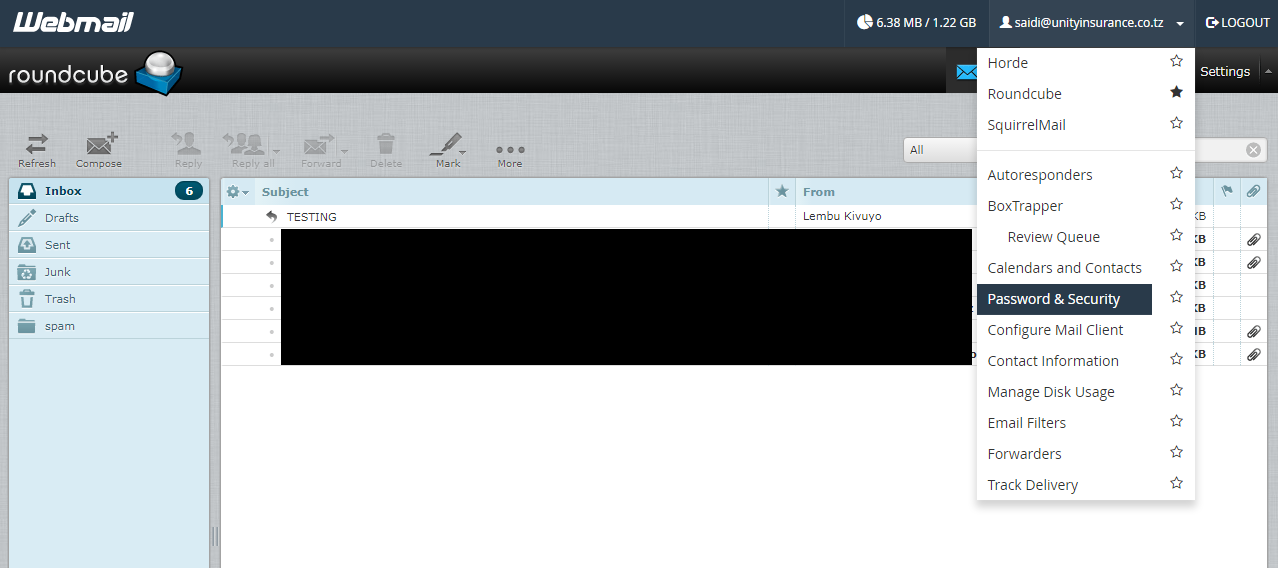
- Login to your email using normal webmail URL
- domainname.com/webmail
- Enter your full email id as a username
- Enter your old password
- Select the webmail application to use
- In the email screen click your email at the top right
- in the popped up menu select password and security
- Enter your new password