by admin | Dec 11, 2025 | Blog News - English, Server Errors
[contact-form][contact-field label=”Name” type=”name” required=”true” /][contact-field label=”Email” type=”email” required=”true” /][contact-field label=”Website” type=”url” /][contact-field label=”Message” type=”textarea” /][/contact-form]
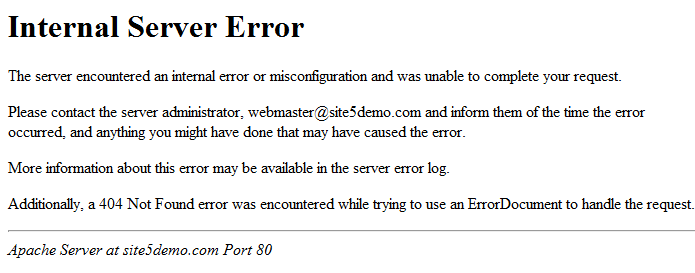
The 500 error is mainly caused by corrupted or misconfigured htacess. folders and files with wrong permission attributes can also cause error 500. Abnormally functioning security or related scripts among others, can cause all these problems.
To resolve this, the website need to be regularly maintained by
- Updating the scripts
- Monitoring the performance of the scripts, bad one need to be removed or replaced
- Database need to be optimized
- htacess file and wp-config.php files need also to be monitored and optimized
- Security extensions need to be optimized
- If folders and files with wrong permission attribute, need to be resolved
- ETC
by admin | Dec 11, 2025 | Blogu ya Kiswahili, Kutengeneza Website
Vitu vinavyotakiwa ili kutengeneza website ya kampuni ya utalii ni hivi hapa chini:
#1. Unatakiwa uwe na domain au jina linaloakisi biashara ya utalii
Mfano
- safariforleisure.com
- safariforleisure.co.tz
- wildlifeadventure.com
- wildlifeadventure.co.tz
- hakunamatatatours.com
- hakunamatatatours.co.tz
#2. Unatakiwa pia kununua hosting
Maelezo kuhusu hosting na tofauti zao
Kwa matumizi madogo tunashauri shared hosting na kwa matumizi makubwa na muhimu tunashauri VPS yaani Virtual Private Server na kwa yale matumizi maalumu yenye kuihitaji usalama wa hali ya juu tunashauri dedicated server. Shared server ni rahisi sana kwani zinakuwa kati ya dola moja hadi dola 10 kwa mwezi wakati, VPS inakupatia vionjo vyote vya dedicated server kwa bei ya wastani kati ya dola 10 hadi chini ya mia kwa mwezi. Dedicated server senyewe bei zake ziko juu kwani zingine zaweza fika dola mia na zaidi kwa mwezi
#3. Taarifa za website
Ukishanunua hosting unatakiwa kuanda taarifa za kuweka kwenye website kwa mfumo huu hapa chini. Kumbuka taarifa ni pamoja na maneno, sauti, video na picha.
Tuwasiliane kwa maelezo na huduma bora
by admin | Dec 10, 2025 | Website Security
Spam User Alert: yanz@123457
Registered Email: [email protected]
Privileges: Administrator
Actions Taken by the Bot-Generated User:
- Disables All Plugins: The bot starts by disabling all the existing plugins on your website, rendering many functionalities inactive.
- Installs Its Own Plugins: The bot installs malicious plugins designed to compromise your website’s security and functionality.
- Changes Folder and File Permissions: The bot alters the permissions for various folders and files, gaining unrestricted access and control.
- Transforms Website to Phishing Site: Over time, the bot modifies your website’s structure and content, turning it into a phishing website aimed at deceiving your visitors.
Steps to Counteract the Bot’s Actions:
- Delete All Spam Users: Remove the user yanz@123457 and any other spam users created by the bots.
- Restore Folder and File Permissions: Reset all folder and file permissions to their original state to ensure secure access.
- Reactivate Disabled Plugins: Enable all the plugins that were disabled by the bot.
- Delete Malicious Plugins: Remove any plugins installed by the bot that were not part of your original setup.
- Harden Your Website: Implement additional security measures, such as blocking the user yanz@123457, to prevent future attacks.
- Regular Monitoring: Visit your website daily or weekly to examine any changes and ensure everything is functioning as expected.
- Install Monitoring Plugins or Services: Use plugins or services that can report any changes to your website. Ensure all newly created users are manually approved.
- Maintain Regular Manual Backups: Always retain a fresh, latest manual backup of your website. In case anything beyond security measures happens, you can quickly restore your site to a previous state.
By taking these steps, you can safeguard your website from such malicious activities and maintain its integrity.
by admin | Dec 8, 2025 | Website Management
Fee: TZS 250,000
Your website is more than just pixels—it’s your brand, your business, your reputation. If it’s been hacked, you need more than a quick fix. You need deep cleansing, smart recovery, and rock-solid defense moving forward. That’s exactly what this package delivers.
What This Service Covers
A hacked WordPress site can lead to spam, lost traffic, blacklisting, or worse—compromised user data. Our service provides a comprehensive restoration plus a maintenance plan to protect your digital presence long-term.
Full Malware Removal and System Cleanup
We start by diving into the heart of the breach to eliminate every trace of malicious activity.
Cleanup Activities
- Deep malware scan using tools like Wordfence and Sucuri Scanner
- Identification and removal of injected code, backdoors, and fake admin accounts
- Replacement of compromised core files and plugins
- Cleanup of suspicious database entries and rogue redirects
Security Hardening Measures
We don’t just clean—we strengthen. After restoring your site, we lock it down to prevent re-entry.
Hardening Tasks
- Update all plugins, themes, and WordPress core to secure versions
- File permission reset: folders to
755, files to 644
- Installation of firewall & brute-force protection plugins
- Enforce 2FA (Two-Factor Authentication) and block XML-RPC abuse
- Disable PHP execution in vulnerable directories
Maintenance Setup and Monitoring
Security isn’t one-time—it’s ongoing. This package gives you continuous protection after restoration.
Maintenance Activities
- Enable weekly backups (on-site & off-site to cloud)
- Schedule automatic updates for plugins/themes
- Run bi-weekly vulnerability scans
- Optimize database and check for unusual traffic spikes